
Enable Sqlite WAL Mode Using ServiceStack.OrmLite.Sqlite.Data
Snippet to automatically enable Sqlite WAL mode when opening connection using ServiceStack.OrmLite.Sqlite.Data
Snippet to automatically enable Sqlite WAL mode when opening connection using ServiceStack.OrmLite.Sqlite.Data
First, find out which process is using the port number. To do this, we can use the netstat utility available in windows. Run command line (cmd) and enter the following command, replace <port_number> with the port number that you are trying to find: netstat -aon | findstr :<port_number> The command above will pipe the output from netstat to the findstr command to filter out the result, because by default netstat will return a list of all TCP/IP network connections being used, but in this case we are only interested to find out connections for a specific port number. ...

AutoHotkey script to disable Windows key, Windows key + Tab and Alt + Tab key, useful to prevents accidentally pressing the keys when playing games, etc . . . Disable Alt+Tab ;!Tab::Return LAlt & Tab::Return ; Disable Windows Key + Tab #Tab::Return ; Disable Left Windows Key LWin::Return ; Disable Right Windows Key ;RWin::Return The script above will disable Left Windows key and Left Alt + Tab key only, if you would like to disable both alt tab keys uncomment the following line: ...

If you have a jQuery UI dialog and wanted to reset its position every time the dialog is re-opened, you can add custom function to reset its position in the open event. This can be useful if you use the close method to close the dialog instance and intend to re-use the dialog box without re-initializing it again, i.e: myCustomDialog.dialog("open"), as the instance is not removed and the next time you re-opened the dialog its last position will be retained to the position before you close the dialog box. ...
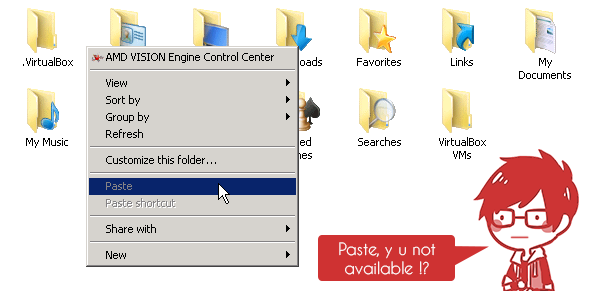
I was using remote desktop connection the other day to copy some files over to one of the server, however I noticed that the paste button is not available (it was greyed out) even after I have copied some files from my local computer, copying text does not work either. I did a quick check on the remote desktop option to make sure that the clipboard option was enabled, and apparently it was enabled however the clipboard still does not work . ...
Using ngrok is a great way to quickly demo/show your development to other people or for other purposes that you can think of by creating a tunnel from your local computer to the internet and the best part is it is free, you don’t even need to sign up to use its service although signing up will provide you with additional features and you can even pay for even more additional features available for paid user. You can read more about the features from ngrok official website: https://ngrok.com. ...
By default Microsoft’s OneDrive (Formerly SkyDrive) is now built into Windows 8.1 and Windows 8.1 RT, hence whether you are using it or not it will automatically loaded during start up and the shortcut to your OneDrive folder will be displayed in the Explorer’s Navigation Pane. And since it is now integrated into Windows 8.1 there is no way to uninstall OneDrive, which is rather annoying as I’m not using OneDrive for my cloud storage. However, thankfully you can easily disable OneDrive in Windows 8.1. ...
Using SqlParameter in SqlCommand is a great way to pass variable into SQL statement and prevent SQL Injection, it is rather simple to implement as well, basically all you need to do is to declare the parameter name in your SQL statement or stored procedure and make sure that you add the parameter with the specified parameter name into the SQL command parameters. Here’s an example of basic implementation of SqlParameter: ...

DeviantArt: Kuuro #3 - Random Doodle

This code snippet will shows you an example on how to initialize a new anonymous type and define the properties while at it as a function parameter in Visual Basic .NET. The example used is based on Flurl library by tmenier, and URL builder for .NET check it out at the Project’s GitHub Page, it’s pretty neat. Dim url = "http://www.some-api.com".AppendPathSegment("endpoint").SetQueryParams(New With { Key .api_key = ConfigurationManager.AppSettings("SomeApiKey"), Key .max_results = 20, Key .q = "Don't worry, I'll get encoded!" }) Alternatively you can omit the Key keyword if you are not planning to compare the Anonymous type for equality and planning to change the value of the property, like so: ...